Supplier evidence request checklist

Use this checklist to assemble a supplier evidence request before it leaves your organisation. It separates the items needed together from the alternative ways an individual item may be supported. A folder containing many documents can still leave one essential question unanswered.
The editable Word file contains instructions, a blank request cover, a repeatable evidence-item card, a pre-send check and a completed fictional example. The PDF is a print copy of the same five-page pack. These are manually completed forms: there are no formulas, automatic checks, macros or transmissions.
Define the request as a set of questions
Start with the specific reporting use, supplier entity, site or product and period. Assign a request ID and version. Name the internal owner who can decide whether the proposed evidence is sufficient for that use. The template records that decision; it does not make it.
For each required item, write the question the evidence must answer and the minimum identifying details it must retain. Use a stable item ID such as E1 or E2. Keep an item separate when its answer could remain unresolved while another item is fully supported.
The GOV.UK Service Manual asks form designers to establish why information is needed and how it will be checked. That is narrow design context for this original supplier-request pack. Its guidance concerns government services and does not impose an ESG reporting requirement on this user.
Distinguish required items from permitted alternatives
Mark which items must be answered together. Then record any acceptable alternatives inside the relevant item. For example, a controlled monthly schedule might be an accepted alternative to individual bills for a quantity question. It cannot automatically replace a separate explanation of which site those quantities cover.
An alternative needs a named approving role, the limits of its use and the information it must preserve. Leave an unapproved suggestion marked for decision. A supplier’s preference, a confidentiality label or the mere existence of a public report does not make it an accepted substitute.
One document may answer two items when it contains both sets of required details. Link it to each item with the relevant page, row or section. Conversely, three documents supporting the same item do not answer three different questions. The item list measures what was requested; attachment counts measure files.
Read the fictional two-item request
All suppliers, sites, meters, documents and quantities in the download are invented. The buyer wants to review a supplier’s stated purchased-electricity quantity for Site H during July to September 2026. The owner has approved that limited activity-data question. No product allocation, emissions calculation or renewable-electricity claim is requested.
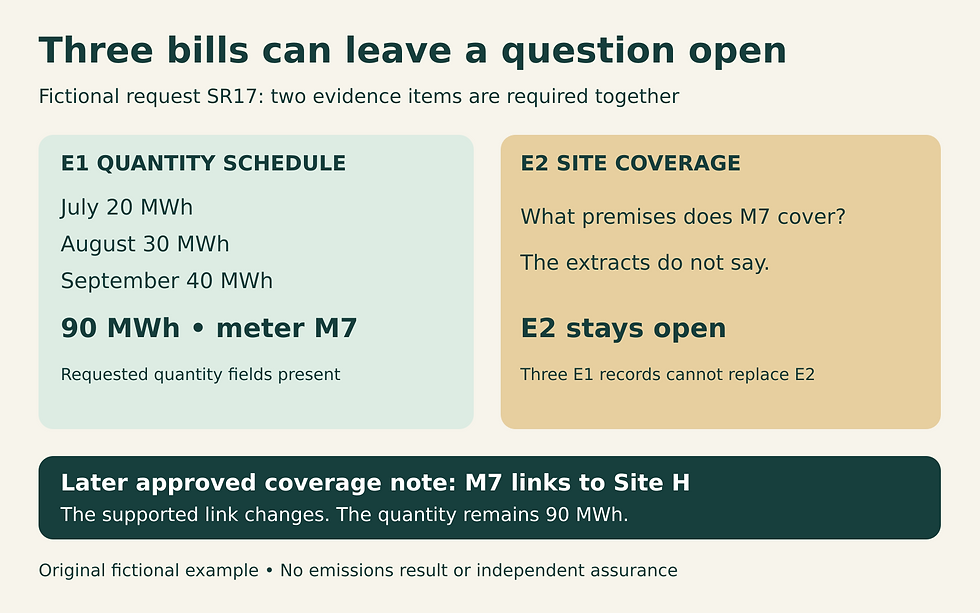
E1 asks for the three monthly quantities, units, dates and source references. E2 asks which meter or billing coverage connects those records to Site H, including relevant exclusions or shared coverage. Both items are required for this review. The owner has allowed an approved extract instead of complete bills for E1, provided the requested quantity and identification fields remain visible.
In the rehearsal, the first sample answer contains three bill extracts: July 20 MWh, August 30 MWh and September 40 MWh. Each names meter M7. The sum is 90 MWh, but none identifies the premises covered by M7. That answers the stated E1 fields while leaving E2 open. Requesting the same bills again would not address the missing link.
The second sample answer adds a dated, approved coverage note linking M7 to Site H and confirming the stated coverage for all three months. Under the fictional review conditions, E2 now has the requested support. The 90 MWh total is unchanged. The change is a supported record relationship, not extra electricity or a verified emissions result.
A third sample answer offers a group-wide annual sustainability report instead of the coverage note. The pack records that suggestion as an unapproved alternative. A report’s existence does not establish its fitness for Site H and the selected quarter. The owner must decide what further detail would answer E2.
Give the supplier an honest way to respond
Each evidence-item card provides space for supplied evidence and its locator, information not held, a sharing restriction, an unclear request, or a proposed not-applicable explanation. These are response routes, not supplier ratings. The internal owner reviews the explanation and next step; an empty field must not silently become zero or not applicable.
Specify the intended audience, permitted purpose, agreed business channel and return date before sending. Ask for a proportionate extract when approved. Do not request passwords, unrestricted personal files or a full commercial contract merely because the form has an attachment field. Keep source material with its authorised custodians when an agreed limited review is sufficient.
The sample pack is deliberately unsigned and unsent. Completing the checklist creates no authority to disclose information, accept portal terms or contact a supplier. Follow the organisation’s own approval and sharing arrangements. Use the confidential-evidence guide when a restriction requires a separate decision.
Test the assembled request before use
Ask a colleague to read the supplier-facing copy without your explanations. Can they identify the required items, distinguish an approved substitute from a proposal, and state what to do if the requested records are unavailable? Run the three fictional replies through your version. If its wording permits the group report to close E2 automatically, revise the request before release.
Record the tested version, the defect found, the change and the owner’s decision. When a later change adds a new purpose, a different site or a wider audience, issue a new approved request version rather than quietly expanding the old one. Keep the previous request with the responses it generated.
Download and use the checklist
Download the editable supplier evidence request checklist (DOCX) or the print copy (PDF). Duplicate the evidence-item card for additional questions, retain stable IDs, and remove the completed example from the copy sent to a supplier. Keep your internal design and approval notes in your controlled file.
This pack ends when the request is ready for authorised issue. Use the supplier ESG response tracker to manage the subsequent exchange. The purpose-led questionnaire guide helps decide what belongs in a collection round; this template turns an approved request into item-by-item evidence instructions.
Source checked 14 October 2026: GOV.UK Service Manual, Structuring forms, section on the reason for each question. Contains public sector information licensed under the Open Government Licence v3.0. All forms, cases and diagrams are original. This resource provides no legal opinion, supplier certification or independent assurance.


Comments